Format company name is the cleanup step before personalization. Scraped data is rarely presentation-ready: you'll have names like acme industries, llc, WIDGETCO GmbH, or even a raw URL like https://hubspot.com. Format company name turns all of those into clean, consistent text you can confidently drop into an email template or AI prompt.
This is the difference between "Hi team at acme industries, llc," and "Hi team at Acme Industries," — small but the kind of detail that immediately tells a recipient whether a message was hand-written or auto-generated.
When you add a Format company name column, you'll see a simple settings panel with two fields.
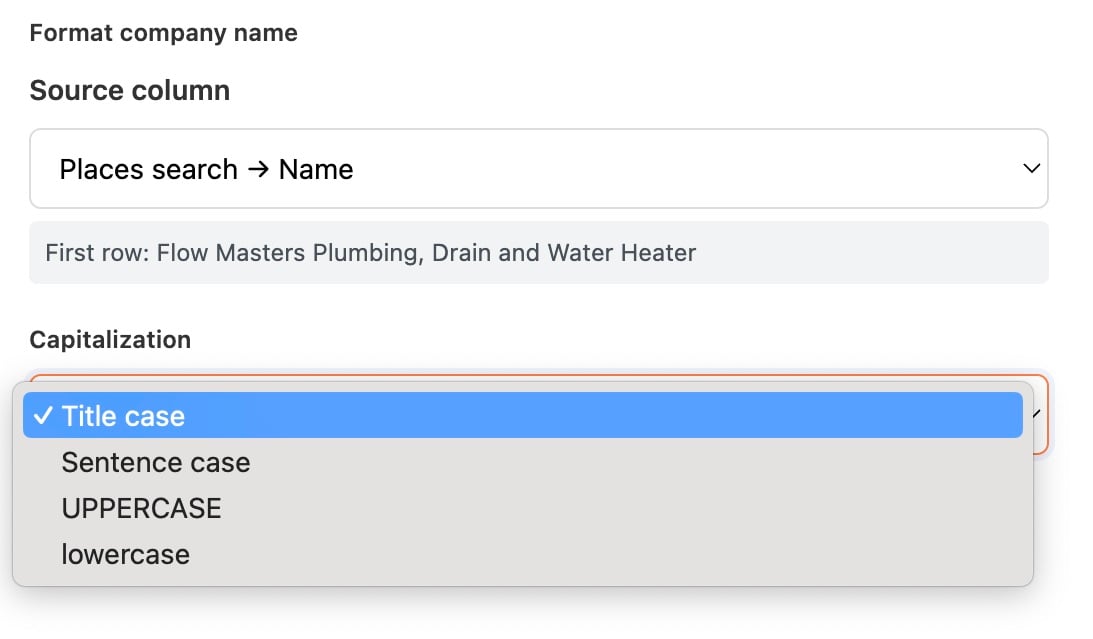
Pick the column containing the company names you want to clean. This can be:
A name column from Places search (e.g. Places search → Name)
A scraped Title or Body text field
A raw URL column — Format company name will convert URLs to a clean company name automatically (https://hubspot.com → Hubspot)
A CSV column you pasted in with messy names from your CRM or spreadsheet
Manycrawl shows the first row's value as a preview so you can confirm the input.
Pick how the cleaned names should be cased:
Title case (default) — Flow Masters Plumbing — first letter of each word capitalized. Best for emails and personalization.
Sentence case — Flow masters plumbing — only the first letter capitalized.
UPPERCASE — FLOW MASTERS PLUMBING — all caps. Useful when matching against systems that normalize to uppercase.
lowercase — flow masters plumbing — all lowercase. Useful when matching against systems that normalize to lowercase.
Format company name runs every input through a few automatic cleanup steps:
Strips legal suffixes — Ltd, Inc, LLC, GmbH, S.A., and similar are removed
Removes junk characters — extra commas, trailing dashes, weird symbols
Converts URLs to names — https://hubspot.com becomes Hubspot
Normalizes whitespace — collapses double spaces and trims edges
Applies your chosen capitalization — Title case by default
This is the most useful detail about Format company name: any output longer than 25 characters is highlighted in red in the table for manual review.
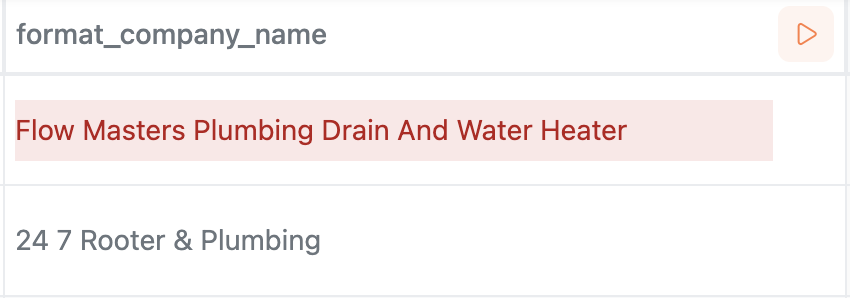
In the example above, Flow Masters Plumbing, Drain and Water Heater came out as Flow Masters Plumbing Drain And Water Heater — technically clean, but way too long to use comfortably in an email greeting. The red highlight tells you "this row needs your eyes before you send."
Most company names should be 1–3 words. When you see a red row, it usually means:
The source contains a tagline mashed onto the name (Acme Industries — The Plumbing Experts)
Multiple business names got concatenated (Places search occasionally returns this)
The source isn't actually a company name (a job title or a slogan slipped through)
The fix is usually a quick manual edit on those few rows, not a re-run of the whole enrichment.
You've used Places search to pull a few hundred local businesses, and you're about to chain Analyze and Write to generate personalized email openers. Without cleanup, the AI sees inputs like 24/7 ROOTER & PLUMBING, INC. and either parrots the messy version back into the email or invents weird interpretations of the formatting.
Setup:
Source column: Places search → Name
Capitalization: Title case
Hit Update Column. Within seconds every name is normalized — Acme Plumbing Llc becomes Acme Plumbing, 24/7 ROOTER & PLUMBING becomes 24/7 Rooter & Plumbing.
Then reference the cleaned column in your Analyze and Write prompt:
Write a one-sentence cold email opener for {Format company name},
a local business in the {Category} space.
Keep it under 25 words.
Now the AI sees Acme Plumbing instead of acme plumbing llc, and the output sounds hand-written instead of auto-generated.
De-dupe a messy CRM export. Inconsistent capitalization is the #1 reason "Acme Inc" and "ACME, INC." don't dedupe in a CRM. Running Format company name across the company column normalizes them so duplicates collapse properly.
Convert URL lists to company names. Got a list of domains but need readable company names for a report or pitch deck? Point Format company name at the URL column and you have clean names instantly.
Standardize a CSV import. Before importing into Manyreach or any outreach tool, run Format company name across the company column so every email greeting reads naturally.
Title case is almost always what you want. It's the format that reads cleanly in emails, LinkedIn messages, and ad copy. Use the other options only when your destination system requires a specific casing.
Watch the red rows. They're not errors — the enrichment ran successfully. They're flagged so you can decide whether to manually shorten a name before it lands in a customer-facing message.
Run this before Analyze and Write. Clean inputs produce clean outputs. The AI handles personalization much better when company names are already normalized.
No API key needed. Format company name runs entirely in your browser using deterministic rules — no AI, no provider calls, no cost per row.