Format personal name is the cleanup step for contact names, especially names scraped from LinkedIn, Twitter, or any platform where people decorate their display names with emojis, pronouns, certifications, and taglines. The enrichment strips all of that out and leaves you with just the name — ready to drop into an email greeting.
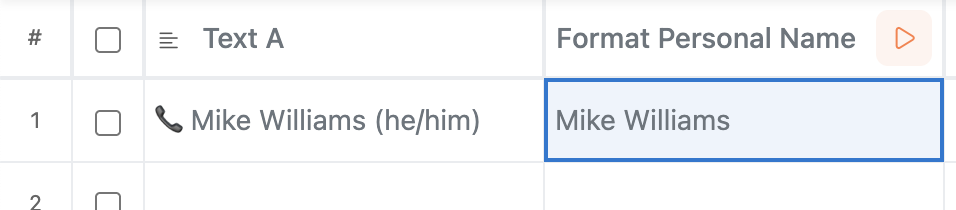
In the example above, 📞 Mike Williams (he/him) becomes Mike Williams. Same idea, applied across every row in your table at once.
Format personal name has the simplest setup of any enrichment in Manycrawl — one field.
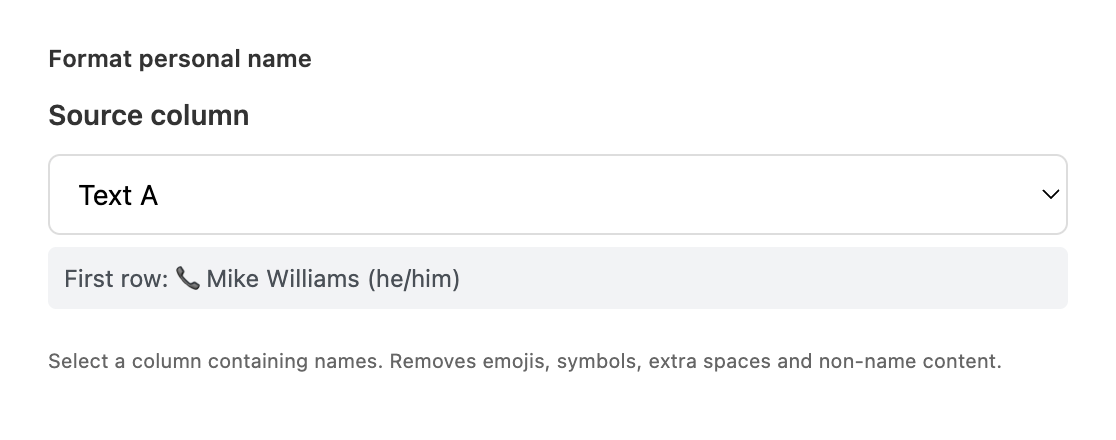
Pick the column containing the personal names you want to clean. This can be:
A name field from a CSV you pasted in
A scraped Title field from a LinkedIn profile (often shaped like Name – Job Title – Company | LinkedIn)
A Title field from a Search Engine result targeting LinkedIn profiles
Any column where names are mixed with other content
Manycrawl shows the first row's value as a preview so you can confirm the input.
That's it — no other settings to configure. Hit Create and run.
Format personal name runs every input through a few automatic cleanup steps:
Removes emojis — 📞 🚀 ✨ 🇺🇸 and the hundreds of others that show up in display names
Removes pronouns in parentheses — (he/him), (she/her), (they/them)
Strips symbols and punctuation noise — extra dashes, asterisks, pipes, brackets
Trims certifications and credentials — PhD, CPA, MBA and similar suffixes
Normalizes whitespace — collapses double spaces and trims edges
Keeps just the name — first name and last name, in normal case
The result is the cleanest version of the name the source could give you, ready for personalization.
You've used Search Engine to find LinkedIn profiles, and the Title field is shaped like 🚀 Sarah Chen (she/her) – Head of Growth @ Acme | Driving B2B SaaS revenue. If you drop that into an email greeting, you get "Hi 🚀 Sarah Chen (she/her) – Head of Growth @ Acme | Driving B2B SaaS revenue," — which is, obviously, not sendable.
Setup:
Source column: the Title column from your Search Engine results (or a Split cell output isolating the name portion)
Hit Create and run. Within seconds every name is normalized — emojis gone, pronouns stripped, credentials trimmed, just Sarah Chen.
Then reference the cleaned column in your Analyze and Write prompt or email template:
Hi {Format personal name},

I noticed {Company} recently launched...
Now your greeting reads naturally instead of like a bot blasted through your prospect list.
Clean a CRM export. Sales reps and SDRs often type names with extra spaces, trailing commas, or accidentally pasted titles. Run Format personal name across your contact column before importing into a new tool to avoid weird greetings in templates.
Normalize names from multiple sources. If you've combined leads from LinkedIn scrapes, event lists, and CSV imports, names will be inconsistent — some have pronouns, some have credentials, some are all caps. One Format personal name pass standardizes everything.
Prep names for AI personalization. Like Format company name, this enrichment makes downstream AI prompts noticeably better. Clean inputs produce clean outputs — the AI won't try to interpret pronouns or emojis as part of the name.
Run this immediately after a LinkedIn scrape. LinkedIn names are the messiest you'll encounter. Cleanup before any downstream enrichment that references the name (Find email by name, Analyze and Write, email templates) saves a lot of headaches.
Use it with Split cell for LinkedIn titles. If your source is a full LinkedIn page title like Name – Job Title – Company | LinkedIn, run Split cell first to isolate the name portion, then Format personal name to clean the result. Two cheap, fast columns and you have a perfect name field.
Pair with Format company name. Cleaning both the personal name and company name in the same pipeline means every email greeting reads naturally — Hi Sarah, I saw Acme just launched... instead of Hi 🚀 sarah chen (she/her), I saw acme inc. just launched...
No API key needed. Format personal name runs entirely in your browser using deterministic rules — no AI, no provider calls, no cost per row.