When Manyreach connects to your email provider (Google Workspace, Outlook, Namecheap, or any other) to trigger a send, it does so from an IP address. That IP is logged by your provider and stamped into the Received: headers of every email that goes out.
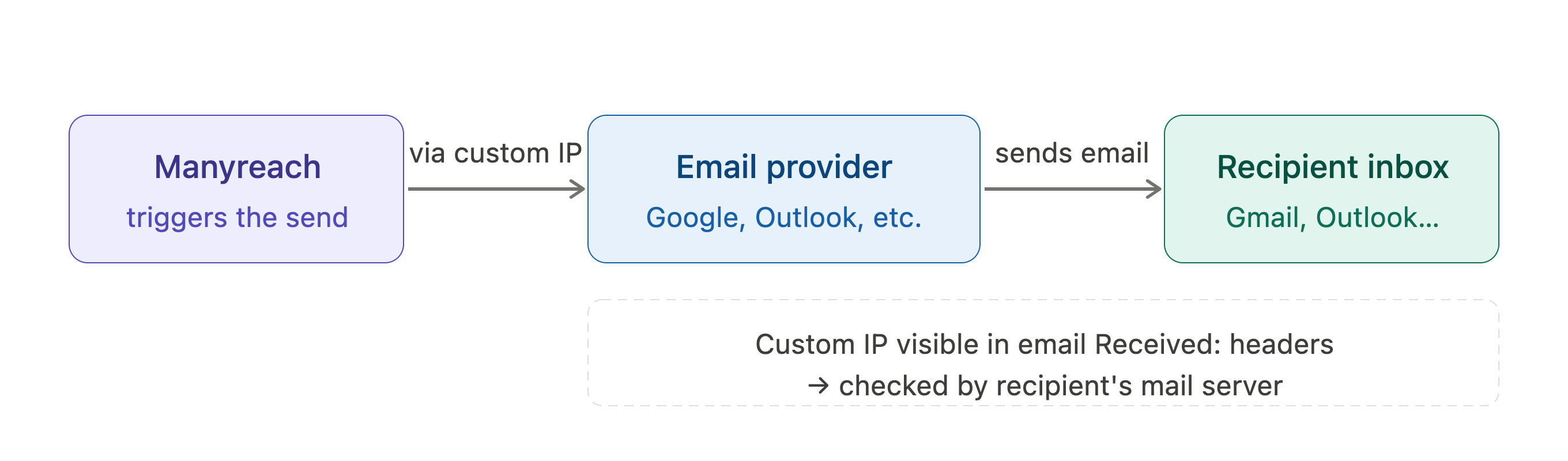
Recipient mail servers read those headers. They check the IP's reputation, cross-reference it against blacklists, and use it as one of several signals when deciding whether your email lands in the inbox or the spam folder.
A custom IP gives you a dedicated address that belongs to your account alone — no shared neighbours, no reputation spillover.
Every custom IP is sourced directly from Microsoft infrastructure. That means you're starting from a clean slate — no baggage from previous owners, no pre-existing blocks to dig out of. A fresh IP gives your sending reputation the best possible foundation.
Manyreach continuously monitors your IP against major blacklists. If a problem is detected, you're notified immediately so you can act before it affects deliverability.
In the unlikely event your IP ends up on a blacklist, we replace it for free. No support tickets, no waiting — a clean replacement is issued and you can resume sending.
When a recipient's mail server receives your email, it inspects the full delivery chain — including the IP in the Received: headers. Here's what that means for you:
Reputation is yours to build. Your sending behaviour — volume consistency, bounce rates, engagement — builds a reputation tied directly to your IP. No one else's mistakes affect you.
Blacklist checks happen in real time. Services like Spamhaus and Barracuda check the sending IP the moment an email arrives. A clean IP passes without friction.
Reputation is traceable. With a dedicated IP, your consistent sending history builds a verified track record with providers over time — rather than being an anonymous address in a shared pool.
Whitelisting for self-hosted setups. If your recipients' mail is handled by a self-hosted server (cPanel, Plesk, Exchange on-premises), their admins can add your dedicated IP directly to an allowlist — giving your emails a guaranteed path to the inbox regardless of reputation scoring.
You can assign a custom IP at three levels. The hierarchy works top-down: if an account doesn't have its own IP, it falls back to the level above it.
The Main IP acts as the default across your entire Manyreach account. Any workspace or clientspace that hasn't been assigned its own IP will send through it automatically.
Best for: Accounts where all sending should share a single reputation and you want one IP to manage.
Assign a dedicated IP directly to a workspace or clientspace. Only senders within that account will use it — completely isolated from your Main IP and from each other.
Best for: Agencies managing multiple clients, or teams with distinct audiences where reputation isolation matters.
If no IP is assigned to your Main account, Manyreach falls back to the shared IP pool for Main and any sub-accounts that also have no dedicated IP assigned. Sub-accounts with their own IP assigned continue to use it regardless.
Best for: Accounts in early stages, or low-volume senders who don't yet need dedicated infrastructure.
Account level
IP assigned?
Sends through
Main | Yes (IP A) | IP A |
Workspace | No own IP | IP A (inherited from Main) |
Workspace | Yes (IP B) | IP B (isolated) |
Clientspace | Yes (IP C) | IP C (isolated) |
Main | No | Shared pool |
Workspace (no own IP) | No | Shared pool (inherited from Main) |
Custom IPs are included in certain subscription plans and are available as an add-on from your account settings. Once assigned, Manyreach handles the connection routing automatically — no technical configuration required on your end.
If you have questions about which setup is right for your account, reach out to our support team.