Cold email lives and dies by deliverability, and bounces are the fastest way to wreck it. Every time you send to a dead or invalid address, mailbox providers like Google and Microsoft log it as a negative signal against your sending domain. Let enough bounces through and your messages start landing in spam — even for the prospects whose addresses are perfectly fine.
Validating before you send gives you:
A protected sender reputation. Keeping your bounce rate low (ideally under a few percent) is one of the biggest levers on inbox placement. Validation removes the addresses that would otherwise bounce.
More of your sending budget spent on real people. Every mailbox has a daily sending limit. Spending it on addresses that can't receive mail is wasted volume; validation makes sure each send has a chance of landing.
Higher reply rates. Clean lists reach more real inboxes, and more real inboxes means more replies from the same campaign.
Cleaner CRM data. Validation results are written back to each prospect, so you can filter and segment on deliverability instead of guessing.
Validation runs on Data Tokens. One token equals one charged validation result — so a list of 1,000 prospects costs up to 1,000 tokens, depending on how many return a chargeable result. Each prospect comes back with a deliverability status you can see and filter on in the CRM.
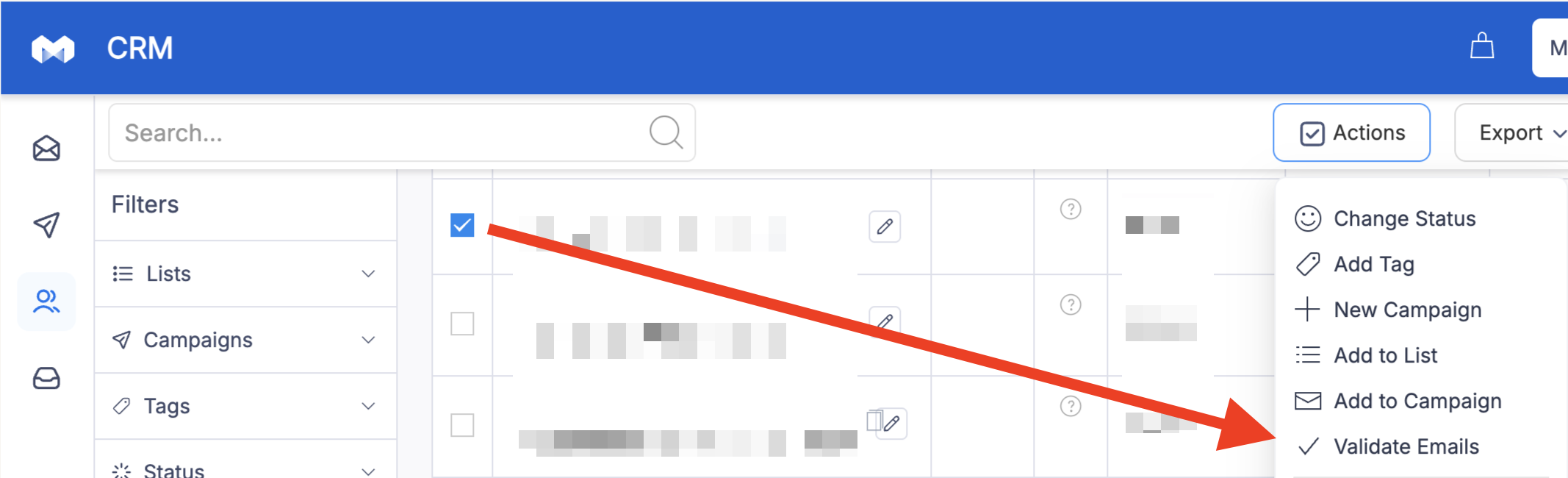
You can validate any selection of prospects on demand:
Open your CRM.
Tick the checkbox next to one or more prospects (or select a whole filtered view).
Click Actions in the top right.
Choose Validate Emails.
Results are written back to each prospect once validation finishes.
Email data doesn't stay accurate. People change jobs, companies shut down, domains move, and mailboxes get deactivated. As a rule of thumb, 2–3% of B2B email addresses go stale every month, which adds up to roughly a quarter of a list over a year. A list that was clean when you first imported it is not clean six months later.
This matters most when you're resending to prospects who didn't reply the first time. A non-response is often a quiet signal that the address is no longer monitored — or no longer exists. Resending to a list you validated months ago can produce a sudden spike in bounces, which is exactly what damages the sending domain you've been carefully warming.
A practical cadence:
Always validate a new list before its first campaign.
Re-validate before any resend if it's been more than ~90 days since the last check. After about three months, enough addresses have decayed that an un-checked resend is a real risk.
Always re-validate non-responders from campaigns that are 6+ months old. These are the most decayed addresses on your list and the most likely to bounce.
In short: if you're about to re-engage cold prospects who went quiet, run them through Actions → Validate Emails first. It costs a handful of tokens and protects the reputation every future campaign depends on.
Every Manyreach subscription includes a baseline of Data Tokens, so you can start validating right away without buying anything extra. If you validate at higher volumes, you can top up with a Data add-on:
Plan | Tokens / month | Price | Rolls over up to |
Data Lite | 10,000 | $19 / mo | 60,000 |
Data Core (most popular) | 30,000 | $39 / mo | 180,000 |
Data Pro | 100,000 | $99 / mo | 600,000 |
Each add-on stacks on top of the tokens already included in your plan, one token still equals one charged validation result, and you can cancel anytime.
Unused Data Tokens don't disappear at the end of the month. They roll over and accumulate for up to 6 months, so occasional large validation runs don't force you to "use it or lose it."
The rollover cap on each add-on is six times the monthly amount:
Data Lite — 10,000/mo, accumulating up to 60,000
Data Core — 30,000/mo, accumulating up to 180,000
Data Pro — 100,000/mo, accumulating up to 600,000
For example, on Data Core you receive 30,000 tokens a month. If you validate nothing in your first month, you start the next month with 60,000. Keep saving and your balance climbs toward the 180,000 cap — six months' worth. Once you hit the cap, fresh monthly tokens keep your balance topped up rather than pushing it higher, and as soon as you spend tokens, room opens up again for the next month's allowance to add on.
This makes the add-on forgiving for spiky workloads: validate a big list one month, coast the next, and your tokens are still there waiting.
Data Tokens are becoming Manyreach's single currency for data features. Right now they power email validation; very soon the same tokens will also power the Email Finder, so the balance you build up now will work for finding new addresses as well as verifying existing ones. Nothing you stock up on today goes to waste — it just gets more uses.